Running a golf camp may look simple when there is only one group, one coach and a handful of participants. The challenge begins when a club wants to offer several weeks, different age groups, flexible attendance, family discounts and dozens—or hundreds—of registrations.
At that point, the camp becomes a real operational unit of the golf club.
Planning capacity, collecting participant information, managing bookings, confirming payments and keeping track of availability all need to work together. This is where golf camp management software can turn what is often a highly manual process into a scalable source of revenue.
Here is how to build that process effectively.
Design the golf camp before opening bookings
Before promoting a camp, clubs need to define exactly what they are selling.
That means establishing:
- Dates and available camp weeks
- Age ranges and skill levels
- Maximum number of participants
- Full-week or individual-day attendance
- Pricing
- Facilities required
- Coach-to-player ratios
- Cancellation policies
- What is included in the price
Capacity deserves particular attention. A club may theoretically have room for 50 participants, but if there are only enough coaches or practice areas for 25, the operational capacity is 25.
The objective is to create a camp format that can be repeated without rebuilding the process every time.
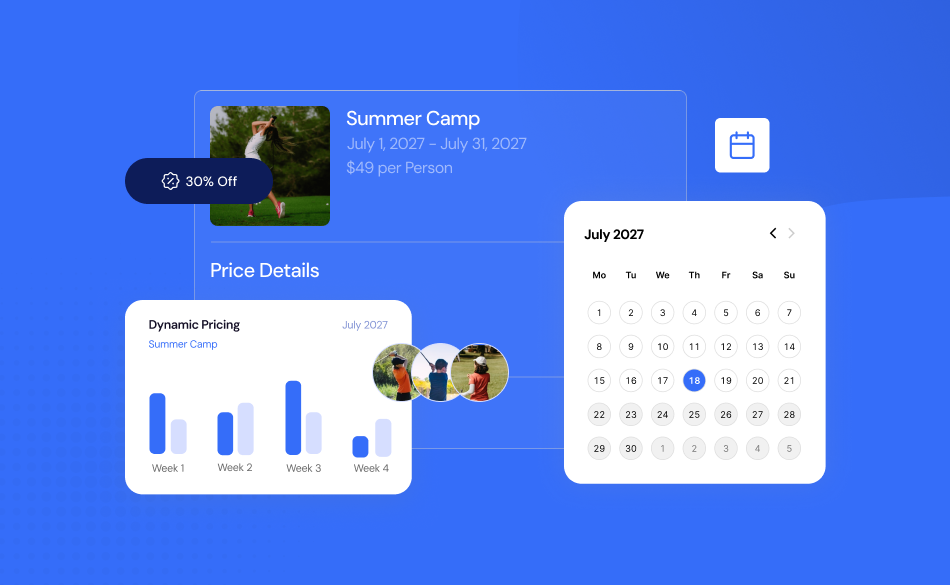
This is one of the areas addressed by Golfmanager Camps, which lets clubs centralise camp creation, weeks, capacity and registration rules while monitoring availability from the same system.
For example, a club could set up four summer camp weeks for players aged 8 to 12, establish the maximum capacity for each week and decide whether families can book an entire week or individual days.
Plan facilities and staff around real capacity
The number of available places is only one part of camp planning. Golf camps compete for resources already used by the rest of the club: the driving range, short-game facilities, putting greens, classrooms, simulators and, in some cases, the golf course itself. Managers should therefore build the schedule backwards from the resources available.
If a morning session requires six driving range bays and an afternoon session uses part of the course, those resources need to be considered alongside ordinary club activity.
The same principle applies to instructors. A camp with 30 juniors may require a very different staffing model from one with 12 experienced players.
The key question is not simply:
How many people can we sell the camp to?
It is:
How many people can we serve properly with the resources available?
Golfmanager’s Activity Management tools can also connect activities with the wider club operation, including capacity rules and the ability to block the Tee Sheet when an activity occupies the course.
Make golf camp registration self-service
Once the camp has been created, booking should be as easy as possible.
Families should not need to call reception to ask:
- “Are there places left?”
- “Can my nine-year-old attend?”
- “Can I book only Wednesday and Thursday?”
- “What is the total price?”
Every unnecessary interaction increases administrative workload and creates another opportunity for the booking to be abandoned.
A good online registration flow should allow customers to:
- Choose the camp.
- Select their preferred dates.
- Enter participant information.
- Confirm eligibility.
- Review availability and price.
- Pay.
- Receive confirmation.
Golfmanager Camps allows families to register remotely, displays real-time availability and pricing, and can automatically validate participant age. Clubs can offer registration for full periods or individual days.
This is particularly important during the weeks before summer, when clubs may receive a large number of registrations in a short period.
Instead of turning that demand into more work for reception, the booking process becomes part of the club’s digital operation.
Collect the information coaches actually need
Golf camp registration involves more than collecting a name and payment.
Especially for junior camps, clubs may need information such as:
- Emergency contact details
- Allergies
- Medical information
- Parental consent
- Dietary requirements
- Other relevant participant information
The problem with collecting this through separate emails, PDFs or spreadsheets is that important information quickly becomes fragmented.
The people running the camp need access to the information that matters.
Golfmanager Camps centralises operational information including medical forms, allergies and parental authorisations alongside registrations and payments.
Golfmanager’s broader Activity Management functionality can also create custom registration forms with required fields and eligibility criteria such as age, handicap, gender or licence.
That creates a much cleaner handover between the administrative team accepting the booking and the professionals delivering the camp.
Build a pricing strategy around how families actually book
Not every customer wants to buy a golf camp in the same way.
Some parents want a full week. Others may only need three days. Families with two children may be more price-sensitive than those registering one participant.
Rather than forcing every customer into one rigid product, clubs can structure pricing around those behaviours.
For example:
| Option | Example price |
| Full camp week | €295 |
| Individual day | €70 |
| Second sibling | 10% discount |
These figures are illustrative, but the underlying strategy matters.
A sibling discount, for example, should not simply be viewed as lost revenue. If it encourages a family to register two children instead of one, the total value of the booking increases.
Golfmanager Camps supports pricing for complete weeks or individual days and allows automatic sibling discounts to be applied during booking. The customer can see a clear summary before completing payment.
The result is a pricing structure that is easier for customers to understand and easier for the club to administer.
Connect registration and payment
A registration should not create another administrative process.
If the booking exists in one system while payment is tracked through a spreadsheet, bank transfer or separate payment gateway, staff still need to reconcile the two manually.
This becomes especially problematic when registrations arrive quickly.
Imagine a camp with 80 applicants:
- 63 have paid.
- 8 payments have failed.
- 5 families believe they have paid.
- 4 places were booked by phone.
Without a connected system, determining the real occupancy becomes unnecessarily difficult.
Golfmanager Camps allows clubs to monitor registrations, payments and occupancy together. Golfmanager’s Online Payments module integrates payment information with the management platform and supports more than 100 payment methods through its payment-provider ecosystem.
This creates a much more useful operational principle:
A booked place and its payment status should never become two separate pieces of information.
Manage capacity in real time
Camp capacity changes constantly.
Every new registration affects availability. Every cancellation can reopen a place. Every additional participant may alter staffing or facility requirements.
For this reason, capacity should not live in a spreadsheet that someone needs to update manually.
Golfmanager Camps provides weekly availability management and is designed to prevent overbooking.
For activities more broadly, Golfmanager also supports maximum-capacity rules and waiting lists that can automatically promote another customer when somebody cancels.
For busy camps, this matters commercially as well as operationally.
A place that becomes available three days before the camp starts still has value. A connected waiting list gives the club a better chance of selling it instead of leaving unused capacity.
Use camp data to improve the next edition
A golf camp should generate more than revenue. It should generate information.
After each camp, managers should review metrics such as:
- Occupancy by week
- Revenue
- Average revenue per participant
- Most popular dates
- Full-week versus individual-day demand
- Customer profiles
- Repeat participation
This changes camp planning from intuition to evidence.
If the first two weeks of July repeatedly sell out while late August reaches only 55% occupancy, next year’s schedule or marketing strategy can be adjusted accordingly.
Golfmanager Reports brings operational and financial KPIs into cloud-based dashboards and allows clubs to build customised reports using data already stored in the platform.
The principle is simple:
This summer’s camp should help the club make better decisions about next summer’s camp.
Think beyond the camp itself
The value of a golf camp does not necessarily end when the final session finishes.
For many junior or beginner golfers, a camp may be their first structured experience with the club.
That creates opportunities for future engagement through:
- Golf academy programmes
- Private lessons
- Junior clinics
- Future camps
- Club activities
- Membership programmes
This is where having camp participants inside the same customer ecosystem becomes valuable.
Golfmanager’s CRM maintains customer activity in a single profile and allows clubs to create segments—including family units—based on customer information and behaviour.
A camp can therefore become more than a seasonal activity. It can become an acquisition and retention channel for the wider club.
What should golf camp management software include?
At minimum, effective golf camp management software should help clubs manage:
- Camps and individual weeks
- Capacity and availability
- Online registration
- Participant eligibility
- Custom registration information
- Online payments
- Flexible pricing
- Discounts
- Waiting lists
- Customer records
- Reporting
The greatest efficiency comes when these functions are not isolated.
Golfmanager connects camp management with the wider cloud platform used to manage bookings, payments, customer information and other areas of the golf club.
Instead of creating another standalone system for a seasonal activity, the camp becomes part of the club’s normal operation.
Make every golf camp easier to run
A successful golf camp is not simply one that sells out.
It is one where participants receive a great experience while the club maintains control over capacity, payments, information and resources without adding unnecessary administrative work.
The real test comes when the model grows.
If running eight camp weeks requires eight times more administration than running one, the process is difficult to scale.
With the right planning and golf camp management software, clubs can create a repeatable system: open new camp weeks, take registrations and payments online, monitor occupancy and use the resulting data to improve the next edition.
Golfmanager Camps brings those processes into the same cloud-based ecosystem used to manage the rest of the club, helping turn camps into a structured and scalable part of the business.
Frequently Asked Questions
What is golf camp management software?
Golf camp management software helps golf clubs organise camp dates, registrations, capacity, participant information and payments digitally rather than managing them across spreadsheets, emails and disconnected systems.
How can a golf club manage camp registrations online?
Clubs can use an online registration system that displays available dates and prices, collects participant details, checks eligibility and allows the customer to complete payment as part of the same booking process.
What information should a junior golf camp collect?
Depending on the camp and local requirements, clubs may need contact information, age, emergency contacts, allergies, relevant medical information and parental consent in addition to standard registration details.
Can golf camp software manage sibling discounts?
Yes. Golfmanager Camps, for example, can automatically apply sibling discounts and supports different pricing for full weeks and individual camp days.
Why integrate golf camps with the club’s management software?
Integration reduces duplicate data and manual work. Registrations, customer profiles, payments and operational information can remain connected instead of being managed through separate applications.